Design Reviews in Allspice help teams review schematic and PCB design changes in context. It's a combination of a traditional design review and an Engineering Change Order (ECO).
Design Reviews are your workflow to track, review, and release changes.
You can discuss issues and changes directly on a schematic and PCB viewer, and keep approval decisions tied to the design history.
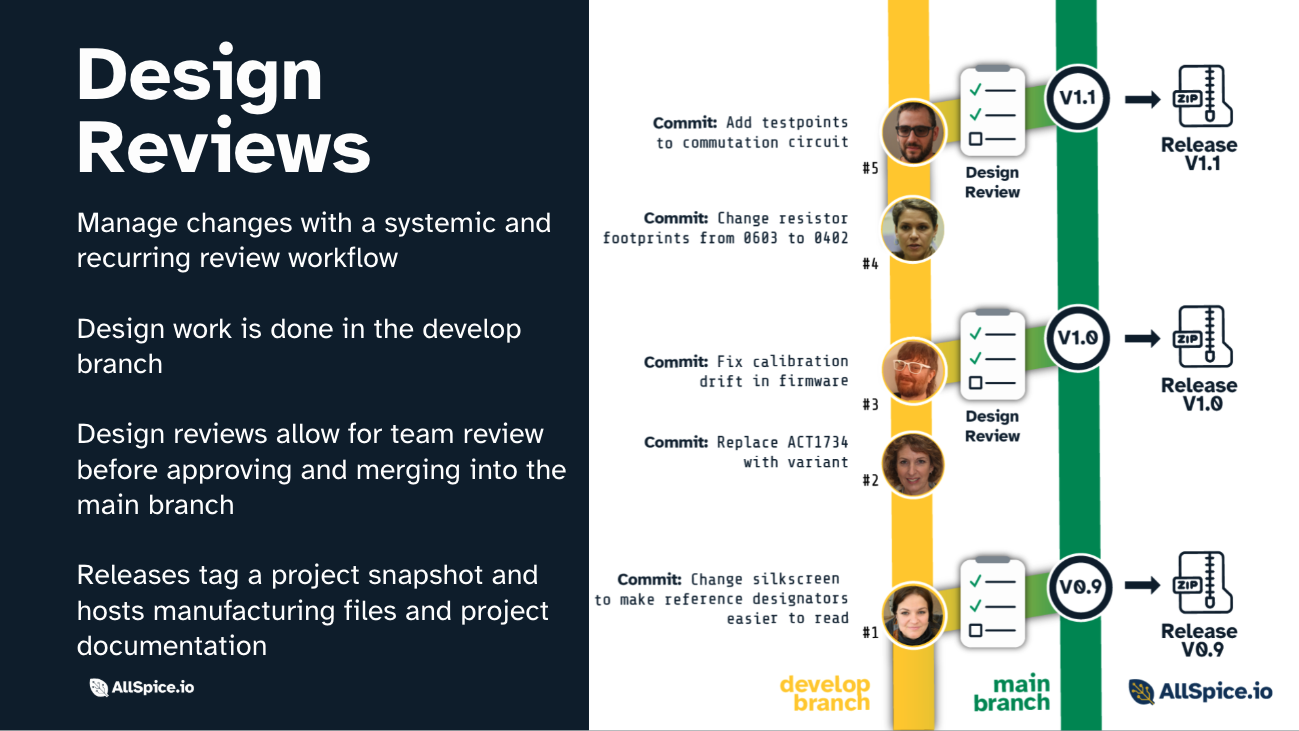
Allspice is built on a Git-based system, but most users do not need to think in Git terms to use the review workflow effectively. Under the hood, a Design Review is a Git Pull Request (i.e. PR) presented in a hardware-friendly review experience.
Quick Review and repository-backed Design Reviews are part of the same review workflow at different stages.
What Design Reviews are for
Design Reviews give teams a shared place to:
- compare changes between file revision snapshots by comparing Git branches
developtomain - leave comments tied to the exact part of the design being reviewed
- keep review discussion, decisions, and follow-up work in one place
- connect review work to issues, milestones, and release progress
- close the loop by merging, reverting, or deleting reviews when work is complete
For many teams, Design Reviews become the main workflow for reviewing engineering changes over time, not just sharing a single snapshot of a design.
Hardware Design Review examples
Traditional hardware workflows are broken down into phases that feed into one another. Design Reviews are used for every phase of circuit design and manufacturing.
- Requirements review
- System block diagram review
- Component selection review
- Preliminary schematic review
- Critical schematic review
- PCB component placement review
- PCB stackup review
- PCB high-speed review
- PCB layout review
- Manufacturing file review (Gerbers, placement, PDFs)
What a Design Review compares
A Design Review is most useful when Allspice can compare one state of the design against another.
That comparison might be between:
- one schematic or PCB file revision and a newer file revision
- one saved snapshot of the design and a later snapshot with changed files
The main branch holds the baseline and the develop branch contains new work.
The goal is the same in every case: show reviewers what changed, not make them re-review the whole design from scratch.
Why the first review can feel confusing
The first review often behaves differently because there is no baseline yet.
If your repository does not already contain a committed reference point, Allspice has nothing useful to compare against. Instead of showing a focused delta, the review may show everything as new.
This is why setup matters so much at the beginning. The first step is not just creating a review. It is creating a clean baseline so future reviews are easy to read.
If you are new to repository-backed Design Reviews, start with Quick Review. It is the easiest way to get your initial files, baseline, and first review into a clean state without having to figure out all of the repository details up front.
Two ways to start a Design Review
There are two common ways to start the same Design Review workflow in Allspice:
-
Quick Review path
Upload files directly, let Allspice automatically create the Design Review, and start commenting right away. This is the best path for onboarding, evaluation, one-off reviews, or situations where you do not want to use Git or repository setup yet. -
Manually create a Design Review
Create and manage Design Reviews from repository history. This is the best path when your team is reviewing changes across commits or branches and needs a repeatable process tied to ongoing development.
Use the repository workflow path when you need:
- version-aware review across commits or branches
- a clear approval and merge workflow
- traceability for comments and review decisions
- coordination across reviewers, issues, and milestones
- a repeatable process for design changes, ECOs, or release prep
If you are evaluating Allspice for the first time, start with Quick Review to have Allspice automatically create your first Design Review. If your team is already working in repositories and needs a process-driven review workflow, continue with the guides below.
Key terms
These are the few terms that matter most:
main: the branch that holds the approved baseline reviewers compare againstdevelop: the branch where new design changes are prepared before reviewbaseline: the starting design state that has already been established and mergeddelta: the difference between the baseline and the newer work under review- Design Review direction: the source
branchand destinationbranchused for comparison
If those terms feel abstract right now, that is okay. The workflow gets easier once you think of Design Reviews as comparing a clear "before" state to a clear "after" state.
Typical Design Review workflow
No matter which path you use to start it, most teams follow a flow like this:
- Create a design review for the changes you want others to inspect
- Compare commits or files to understand exactly what changed
- Minimize the review to the files and diffs that matter most
- Leave comments, resolve feedback, and track related issues or milestones
- Close the review by merging, reverting, or deleting it based on the outcome